
Breadth First Search With Alo
After walking skill improves, Alo can start to travel from one city to another,
focusing on exploring city connections with Breadth-First Search.

Let's explore how cities are connected to one another.
By traveling and creating paths between cities, we can use the DFS algorithm to identify components that connect
cities.
Alo will enjoy this journey and contribute to forming these city components.
Table of Contents For Breadth First Search
- 1.QuickExample
- 2.Introducing Alo
- 3.Exploring City Connections
- 4.Challenges and Solutions
- 4.1. How to create container for city graph and its connection
- 4.2. How to track visited cities
- 4.3. Start with
- 4.4. Cut the list into two parts.
- 4.6. Dry Run
- 5. You Can Write Program in Your Favorite Language
- 6.Run Breadth First Search Code on Replit with Your Favorite Language
- 7.LeetCode Problems on Breadth First Search
- 8.Frequently Asked Question
- 9.Conclusion
Quick Example

City Graph:
Delhi -- Agra Mumbai -- Pune -- Bangalore
| |
Jaipur ------------------------Hyderabad
Kolkata -- Chennai
In this city graph:
Delhi is connected to Agra.
Mumbai is connected to Pune, and Pune is connected to Bangalore.
Delhi is also connected to Jaipur, and Jaipur is connected to Hyderabad.
Kolkata is connected to Chennai.
After travel here is connected component detection
Connected Components:
Component 1:
Delhi -- Agra
Jaipur -- Hyderabad
Component 2:
Mumbai -- Pune -- Bangalore
Component 3:
Kolkata -- Chennai
In this connected component detection:
Component 1 includes cities connected through Delhi and Jaipur, forming a component in the north of India.
Component 2 includes cities connected through Mumbai, Pune, and Bangalore, forming a component in the western
and southern parts of India.
Component 3 includes cities connected through Kolkata and Chennai, forming a component in the eastern part of
India.
Introducing Alo
If you're all about giving instructions and getting things done, you might just have a friend in your life like Alo.
🚀 Meet Alo: The MIND-BLOWING Instruction-Based
Genius! No Senses, No
Thoughts, But
Can Master Algorithmic Concepts? 🤯
He not only teaches you but also provides challenges to make your day happier.😃
Alo Exploring City Connections
List of Cities Delhi, Agra, Mumbai, Pune, Bangalore, Jaipur, Hyderabad, Kolkata, Chennai
Alo will travel and exploring city connections with Breadth-First Search.
Challenges and Solutions
1. How to create container for city graph and its connection
Alo starts by examining the City class, which serves as the building block for our exploration. Each City is defined by its name and a list of its neighboring cities. This makes it easier to traverse the interconnected cities, somewhat like a map! 🗺️
Which type of collection suitable for cities , how to connect cities ?
Check out how Alo can save city and its connections. Where to save city and connetion
// Define a class to represent a city and its neighbors
class City
{
    public string Name { get; }
    public List<City> Neighbors { get; }

    public City(string name)
    {
        Name = name;
        Neighbors = new List<City>();
    }
}
class Program
{
    public static void Main(string[] args)
    {
        // Create City objects
        City mumbai = new City("Mumbai");
        City pune = new City("Pune");
        City ahmedabad = new City("Ahmedabad");
        City hyderabad = new City("Hyderabad");
        City bangalore = new City("Bangalore");
        City jaipur = new City("Jaipur");
        City chennai = new City("Chennai");
        City delhi = new City("Delhi");

        // Define city connections
        mumbai.Neighbors.AddRange(new[] { pune, ahmedabad });
        pune.Neighbors.AddRange(new[] { mumbai, hyderabad, bangalore });
        ahmedabad.Neighbors.AddRange(new[] { mumbai, jaipur });
        hyderabad.Neighbors.AddRange(new[] { pune, chennai });
        bangalore.Neighbors.AddRange(new[] { pune, chennai });
        jaipur.Neighbors.AddRange(new[] { ahmedabad, delhi });
        chennai.Neighbors.AddRange(new[] { hyderabad, bangalore });
        delhi.Neighbors.Add(jaipur);
    }
}
// Define a class to represent a city and its neighbors
static class City {
    String name;
    List<City> neighbors;

    public City(String name) {
        this.name = name;
        this.neighbors = new ArrayList<>();
    }
}
public class Main {
    public static void main(String[] args) {
        // Create City objects
        City mumbai = new City("Mumbai");
        City pune = new City("Pune");
        City ahmedabad = new City("Ahmedabad");
        City hyderabad = new City("Hyderabad");
        City bangalore = new City("Bangalore");
        City jaipur = new City("Jaipur");
        City chennai = new City("Chennai");
        City delhi = new City("Delhi");

        // Define city connections
        mumbai.neighbors.addAll(Arrays.asList(pune, ahmedabad));
        pune.neighbors.addAll(Arrays.asList(mumbai, hyderabad, bangalore));
        ahmedabad.neighbors.addAll(Arrays.asList(mumbai, jaipur));
        hyderabad.neighbors.addAll(Arrays.asList(pune, chennai));
        bangalore.neighbors.addAll(Arrays.asList(pune, chennai));
        jaipur.neighbors.addAll(Arrays.asList(ahmedabad, delhi));
        chennai.neighbors.addAll(Arrays.asList(hyderabad, bangalore));
        delhi.neighbors.add(jaipur);
    }
}
// Define a class to represent a city and its neighbors
class City {
    constructor(name) {
        this.name = name;
        this.neighbors = [];
    }
}
// Create City objects
const mumbai = new City("Mumbai");
const pune = new City("Pune");
const ahmedabad = new City("Ahmedabad");
const hyderabad = new City("Hyderabad");
const bangalore = new City("Bangalore");
const jaipur = new City("Jaipur");
const chennai = new City("Chennai");
const delhi = new City("Delhi");

// Define city connections
mumbai.neighbors.push(pune, ahmedabad);
pune.neighbors.push(mumbai, hyderabad, bangalore);
ahmedabad.neighbors.push(mumbai, jaipur);
hyderabad.neighbors.push(pune, chennai);
bangalore.neighbors.push(pune, chennai);
jaipur.neighbors.push(ahmedabad, delhi);
chennai.neighbors.push(hyderabad, bangalore);
delhi.neighbors.push(jaipur);
#Define a class to represent a city and its neighbors
class City:
    def __init__(self, name):
        self.name = name
        self.neighbors = []

# Create City objects
mumbai = City("Mumbai")
pune = City("Pune")
ahmedabad = City("Ahmedabad")
hyderabad = City("Hyderabad")
bangalore = City("Bangalore")
jaipur = City("Jaipur")
chennai = City("Chennai")
delhi = City("Delhi")

# Define city connections
mumbai.neighbors.extend([pune, ahmedabad])
pune.neighbors.extend([mumbai, hyderabad, bangalore])
ahmedabad.neighbors.extend([mumbai, jaipur])
hyderabad.neighbors.extend([pune, chennai])
bangalore.neighbors.extend([pune, chennai])
jaipur.neighbors.extend([ahmedabad, delhi])
chennai.neighbors.extend([hyderabad, bangalore])
delhi.neighbors.append(jaipur)
use std::cell::RefCell;
use std::collections::{HashMap, VecDeque};
use std::rc::Rc;
//Define a class to represent a city and its neighbors
#[derive(Clone, Debug)]
struct City {
    name: String,
    neighbors: Vec<Rc<RefCell<City>>>,
}

impl City {
    fn new(name: &str) -> Rc<RefCell<City>> {
        Rc::new(RefCell::new(City {
            name: name.to_string(),
            neighbors: Vec::new(),
        }))
    }

    fn add_neighbor(city: &Rc<RefCell<City>>, neighbor: &Rc<RefCell<City>>) {
        city.borrow_mut().neighbors.push(Rc::clone(neighbor));
    }
}

fn main() {
    // Create City objects
    let mumbai = City::new("Mumbai");
    let pune = City::new("Pune");
    let ahmedabad = City::new("Ahmedabad");
    let hyderabad = City::new("Hyderabad");
    let bangalore = City::new("Bangalore");
    let jaipur = City::new("Jaipur");
    let chennai = City::new("Chennai");
    let delhi = City::new("Delhi");

    // Define city connections
    City::add_neighbor(&mumbai, &pune);
    City::add_neighbor(&mumbai, &ahmedabad);
    City::add_neighbor(&pune, &hyderabad);
    City::add_neighbor(&pune, &bangalore);
    City::add_neighbor(&ahmedabad, &jaipur);
    City::add_neighbor(&hyderabad, &chennai);
    City::add_neighbor(&bangalore, &chennai);
    City::add_neighbor(&jaipur, &delhi);

    // Note: Since the cities are undirected, we need to add the reverse connections as well.
    City::add_neighbor(&pune, &mumbai);
    City::add_neighbor(&ahmedabad, &mumbai);
    City::add_neighbor(&hyderabad, &pune);
    City::add_neighbor(&bangalore, &pune);
    City::add_neighbor(&jaipur, &ahmedabad);
    City::add_neighbor(&chennai, &hyderabad);
    City::add_neighbor(&chennai, &bangalore);
    City::add_neighbor(&delhi, &jaipur);
}
- 🏙️ What is a city graph, and why are we creating it?
- A city graph is a way to represent relationships between cities. We create it to model how cities are connected to each other, which can be useful for various applications like route planning or network analysis.
- 📚 What are List<string> and Dictionary<string, List<string>> in C#?
List<string>is a data structure for storing a collection of strings, andDictionary<string, List<string>>is a dictionary where city names are associated with lists of connected cities.- 🔨 What's the purpose of the constructor CityGraph()?
- The constructor initializes an empty list of cities (
cities) and an empty adjacency list (adj). It's the starting point for creating a new city graph. - 🏢 How do we add a city to the graph?
- We use the
AddCity(string cityName)method. It adds the city name to the list of cities and creates an empty list of connections for that city in the adjacency list. - 🌉 What's the
AddConnection(string city1, string city2)method for? - This method connects two cities in the graph. It adds each city to the list of connections for the other city because this is an undirected graph.
- ↔️ What is an undirected graph, and why is it relevant here?
- In an undirected graph, connections between nodes have no direction; they are bidirectional. It's relevant here because it means that if you can travel from city A to city B, you can also travel from city B to city A.
- 🚀 How can I create a city graph instance and add cities and connections to it?
- In the Program class, you can see how to create a CityGraph instance, add cities using AddCity, and establish connections using AddConnection. This code snippet provides an example of how to set up the graph.
2.How to track visited cities
Where to start travel, Find connected path or component
Track, Visit city, Find Connections
// 🔀 Finding connected components using DFS public List<List<string>> ConnectedComponents() { // 📦 Container for components List<List<string>> components = new List<List<string>>(); // 👣 Keeping track of visited cities HashSet<string> visited = new HashSet<string>(); // 🚶♂️ Visiting each city as start node foreach (string city in cities) { // 🤔 Checking if already visited if (!visited.Contains(city)) { // 🆕 Component list List<string> component = new List<string>(); // 🔎 Finding component starting from city DFSUtil(city, visited, component); // ➕ Adding component to result components.Add(component); } } return components; }
// 🔀 Finding connected components using DFS public List<List<String>> connectedComponents() { // 📦 Container for components List<List<String>> components = new ArrayList<>(); // 👣 Keeping track of visited cities HashSet<String> visited = new HashSet<>(); // 🚶♂️ Visiting each city as the start node for (String city : cities) { // 🤔 Checking if already visited if (!visited.contains(city)) { // 🆕 Component list List<String> component = new ArrayList<>(); // 🔎 Finding a component starting from the city dfsUtil(city, visited, component); // ➕ Adding the component to the result components.add(component); } } return components; }
// 🔀 Finding connected components using DFS connectedComponents() { // 📦 Container for components const components = []; // 👣 Keeping track of visited cities const visited = new Set(); // 🚶♂️ Visiting each city as the start node for (const city of this.cities) { // 🤔 Checking if already visited if (!visited.has(city)) { // 🆕 Component list const component = []; // 🔎 Finding a component starting from the city this.dfsUtil(city, visited, component); // ➕ Adding the component to the result components.push(component); } } return components; }
# 🔀 Finding connected components using DFS
def connected_components(self):
# 📦 Container for components
components = []
# 👣 Keeping track of visited cities
visited = set()
# 🚶♂️ Visiting each city as the start node
for city in self.cities:
# 🤔 Checking if already visited
if city not in visited:
# 🆕 Component list
component = []
# 🔎 Finding a component starting from the city
self.dfs_util(city, visited, component)
# ➕ Adding the component to the result
components.append(component)
return components
// 🔀 Finding connected components using DFS fn connected_components(&self) -> Vec<Vec<String>> { // 📦 Container for components let mut components: Vec<Vec<String>> = Vec::new(); // 👣 Keeping track of visited cities let mut visited: HashSet<String> = HashSet::new(); // 🚶♂️ Visiting each city as a start node for city in &self.cities { if !visited.contains(city) { // 🆕 Component list let mut component: Vec<String> = Vec::new(); // 🔎 Finding component starting from city self.dfs_util(city, &mut visited, &mut component); // ➕ Adding component to result components.push(component); } } components }
- Alo: 🤔 "What's the mission of this code, and why are we looking for connected components?"
- Alo's Answer: 🧐 "We're on the hunt for groups of connected cities in our graph, where you can travel from one city to another through a series of connections. This helps us understand the structure of our city network."
- Alo: 📦 "What's the purpose of that container 'components'?"
- Alo's Answer: 🤓 "Ah, that container, 'components,' is like a treasure chest where we'll store our discovered connected components – the groups of cities that are linked together."
- Alo: 👣 "Why is there a 'visited' set, and what's its role?"
- Alo's Answer: 🕵️♂️ "The 'visited' set helps us keep track of which cities we've already explored, so we don't revisit them. It's like marking a city as 'I've been here' on our map."
- Alo: 🚶♂️ "I see we're walking through each city, but why?"
- Alo's Answer: 🌍 "Absolutely, Alo! We're exploring every city in our list to ensure that we don't miss any connected components. It's like taking a stroll through the city network."
- Alo: 🔎 "What happens when we call 'DFSUtil'?"
- Alo's Answer: 🕵️ "Great question! 'DFSUtil' is our trusty explorer, and it helps us find connected components starting from a specific city. It's like a detective searching for clues."
- Alo: ➕ "And why do we add the components to 'components'?"
- Alo's Answer: 📚 "When we discover a connected component, we add it to the 'components' container, like adding chapters to a book. This way, we can keep track of all the groups of connected cities we find."
Alo: Time to Show Travel Cities with Connections
🔍 How to show cities from component?
Alo takes a closer look at the code that performs a Breadth-First Search (DFS)
Recursive traversal to find a connected component in the city graph
Show component with cities
// 🔎 DFS recursive traversal to find component
private void DFSUtil(string city, HashSet<string> visited, List<string> component)
{
    // 📍 Marking city as visited
    visited.Add(city);
    // ➕ Adding city to current component
    component.Add(city);

    // 👀 Looking at connections/neighbors
    foreach (string connectedCity in adj[city])
    {
        // 🤔 Checking iff neighborvisited
        if (!visited.Contains(connectedCity))
        {
            // 🔃 Recursive call on neighbor
            DFSUtil(connectedCity, visited, component);
        }
    }
}
// 🔎 DFS recursive traversal to find a component
private void dfsUtil(String city, HashSet<String> visited, List<String> component) {
    // 📍 Marking the city as visited
    visited.add(city);
    // ➕ Adding the city to the current component
    component.add(city);

    // 👀 Looking at connections/neighbors
    for (String connectedCity : adj.get(city)) {
        // 🤔 Checking if the neighbor is visited
        if (!visited.contains(connectedCity)) {
            // 🔃 Recursive call on the neighbor
            dfsUtil(connectedCity, visited, component);
        }
    }
}
// 🔎 DFS recursive traversal to find a component
dfsUtil(city, visited, component) {
    // 📍 Marking the city as visited
    visited.add(city);
    // ➕ Adding the city to the current component
    component.push(city);

    // 👀 Looking at connections/neighbors
    for (const connectedCity of this.adj.get(city)) {
        // 🤔 Checking if the neighbor is visited
        if (!visited.has(connectedCity)) {
            // 🔃 Recursive call on the neighbor
            this.dfsUtil(connectedCity, visited, component);
        }
    }
}
# 🔎 DFS recursive traversal to find a component
def dfs_util(self, city, visited, component):
# 📍 Marking the city as visited
    visited.add(city)
    # ➕ Adding the city to the current component
    component.append(city)

    # 👀 Looking at connections/neighbors
    for connected_city in self.adj[city]:
    # 🤔 Checking if the neighbor is visited
        if connected_city not in visited:
        # 🔃 Recursive call on the neighbor
            self.dfs_util(connected_city, visited, component)
//🔎 DFS recursive traversal to find a component
fn dfs_util(&self, city: &String, visited: &mut HashSet<String>, component: &mut Vec<String>) {
    // 📍 Marking city as visited
    visited.insert(city.clone());
    // ➕ Adding city to the current component
    component.push(city.clone());

    // 👀 Looking at connections/neighbors
    for connected_city in &self.adj[city] {
        //🤔 Checking if the neighbor is visited
        if !visited.contains(connected_city) {
            // 🔃 Recursive call on neighbor
            self.dfs_util(connected_city, visited, component);
        }
    }
}
- Alo: 🔎 "What's happening in this code with 'DFSUtil'?"
- Alo's Answer: 🌐 "Great observation! 'DFSUtil' is our intrepid explorer that guides us through a city's connections, helping us discover a connected component starting from a specific city."
- Alo: 📍 "What's the significance of 'visited.Add(city)'?"
- Alo's Answer: 🗺️ "When we mark 'city' as visited, we ensure that we don't revisit the same city. It's like adding a checkpoint to our journey map to indicate we've explored that city."
- Alo: ➕ "Why are we adding 'city' to the 'component' list?"
- Alo's Answer: 📂 "Ah, adding 'city' to 'component' keeps a record of the cities we've found in this connected component. It's like collecting treasures in a chest as we explore."
- Alo: 👀 "What's the purpose of 'foreach' in 'adj[city]'?"
- Alo's Answer: 🚀 "The 'foreach' loop takes us on a tour of 'city's connections or neighbors. It's like meeting new people in a city, but these are other cities in our network."
- Alo: 🤔 "Why check if 'connectedCity' is visited?"
- Alo's Answer: 🧩 "Good catch! We're ensuring that we don't revisit cities we've already explored. It's like confirming we're not backtracking in a maze."
- Alo: 🔃 "What's the role of the recursive call to 'DFSUtil'?"
- Alo's Answer: 🔄 "The recursive call lets us continue our exploration from 'connectedCity.' It's like diving deeper into an adventure book, following a trail to the next chapter."
4. Find Connected Component and print the city connection
Alo continues the journey,
Uncovering how the code finds connected components in the city graph and prints them out with a touch of technology.
Show connected Cities in component
// 🔀 Finding connected components
List<List<string>> connectedComponents = cityGraph.ConnectedComponents();

// 🖥️ Printing components
Console.WriteLine("Connected Components:");
int componentNumber = 1;
foreach (List<string> component in connectedComponents)
{
    Console.Write($"Component {componentNumber}: ");
    Console.WriteLine(string.Join(", ", component));
    componentNumber++;
}
// 🔀 Finding connected components
List<List<String>> connectedComponents = cityGraph.connectedComponents();

// 🖥️ Printing components
System.out.println("Connected Components:");
int componentNumber = 1;
for (List<String> component : connectedComponents) {
    System.out.print("Component " + componentNumber + ": ");
    System.out.println(String.join(", ", component));
    componentNumber++;
}
// 🔀 Finding connected components
const connectedComponents = cityGraph.connectedComponents();

// 🖥️ Printing components
console.log("Connected Components:");
let componentNumber = 1;
for (const component of connectedComponents) {
    console.log(`Component ${componentNumber}: ${component.join(", ")}`);
    componentNumber++;
}
 # 🔀 Finding connected components
connected_components = city_graph.connected_components()

# 🖥️ Printing components
print("Connected Components:")
component_number = 1
for component in connected_components:
    print(f"Component {component_number}: {', '.join(component)}")
    component_number += 1
// 🔀 Finding connected components
let connected_components = city_graph.connected_components();

// 🖥️ Printing components
println!("Connected Components:");
let mut component_number = 1;
for component in &connected_components {
    print!("Component {}: ", component_number);
    println!("{}", component.join(", "));
    component_number += 1;
}
- Alo: 🔀 "What's happening here with 'cityGraph.ConnectedComponents()'?"
- Alo's Answer: 🌐 "Excellent question! We're using 'cityGraph.ConnectedComponents()' to find groups of cities that are connected in our city graph. It's like discovering neighborhoods in our city network."
- Alo: 🖥️ "Why are we printing these components?"
- Alo's Answer: 📣 "Aha! We're printing the connected components to see the results of our exploration. It's like revealing the names of neighborhoods we discovered to our friends."
- Alo: 💡 "How does it work to number the components?"
- Alo's Answer: 🧮 "The 'componentNumber' helps us label each connected component. It's like numbering the chapters in a book, so we know which part of the story we're reading."
- Alo: 🧩 "What's going on in the 'foreach' loop?"
- Alo's Answer: 🔄 "In the 'foreach' loop, we're looping through each connected component and printing them out. It's like reading each chapter of a book one by one."
- Alo: 🗂️ "Why is 'string.Join(', ', component)' used?"
- Alo's Answer: 🧬 "Great catch! 'string.Join' combines the city names in a component with commas in between. It's like making a list of ingredients in a recipe."
- Alo: 📈 "What's the bigger picture here?"
- Alo's Answer: 🏔️ "This code helps us visualize how our city graph is structured by revealing connected components. It's like taking a bird's-eye view of our city network and seeing the big picture."
Add table for dry run here
5. Now, you can write the program in your favorite language.
Combine all the steps into a single program.
Remove the comment markers to enable the code for non-recursive use,comment the recursive code
// 😀 Importing required namespaces using System; using System.Collections.Generic; using System.Linq; // 🏙️ CityGraph class definition class CityGraph { // 📜 List of cities private List<string> cities; // 🗺️ Adjacency list to store connections private Dictionary<string, List<string>> adj; // 🏗️ Constructor public CityGraph() { // 🆕 Creating empty list and dictionary cities = new List<string>(); adj = new Dictionary<string, List<string>>(); } // 🏙️ Adding a city public void AddCity(string cityName) { // 📝 Adding to list cities.Add(cityName); // 🗒️ Creating empty connections list adj[cityName] = new List<string>(); } // ➕ Adding a connection between two cities public void AddConnection(string city1, string city2) { // 🤝 Connecting in one direction adj[city1].Add(city2); // ���� Connecting in other direction for undirected graph adj[city2].Add(city1); } // 🔀 Finding connected components using DFS public List<List<string>> ConnectedComponents() { // 📦 Container for components List<List<string>> components = new List<List<string>>(); // 👣 Keeping track of visited cities HashSet<string> visited = new HashSet<string>(); // 🚶♂️ Visiting each city as start node foreach (string city in cities) { // 🤔 Checking if already visited if (!visited.Contains(city)) { // 🆕 Component list List<string> component = new List<string>(); // 🔎 Finding component starting from city DFSUtil(city, visited, component); // ➕ Adding component to result components.Add(component); } } return components; } // 🔎 DFS recursive traversal to find component private void DFSUtil(string city, HashSet<string> visited, List<string> component) { // 📍 Marking city as visited visited.Add(city); // ➕ Adding city to current component component.Add(city); // 👀 Looking at connections/neighbors foreach (string connectedCity in adj[city]) { // 🤔 Checking iff neighborvisited if (!visited.Contains(connectedCity)) { // 🔃 Recursive call on neighbor DFSUtil(connectedCity, visited, component); } } } // 🔎 DFS non-recursive traversal to find a component //private void DFSUtil(string startCity, HashSet<string> visited, List<string> component) //{ // Stack<string> stack = new Stack<string>(); // Create a stack for non-recursive traversal // stack.Push(startCity); // Push the starting city onto the stack // while (stack.Count > 0) // { // string city = stack.Pop(); // Pop a city from the stack // if (!visited.Contains(city)) // { // visited.Add(city); // Mark the city as visited // component.Add(city); // Add the city to the current component // // Look at connections/neighbors // foreach (string connectedCity in adj[city]) // { // if (!visited.Contains(connectedCity)) // { // stack.Push(connectedCity); // Push unvisited neighbors onto the stack // } // } // } // } //} } // 📟 Main program class Program { public static void Main(string[] args) { // 🏙️ Creating graph CityGraph cityGraph = new CityGraph(); // 🏙️ Adding sample cities cityGraph.AddCity("Delhi"); cityGraph.AddCity("Agra"); cityGraph.AddCity("Mumbai"); cityGraph.AddCity("Pune"); cityGraph.AddCity("Bangalore"); cityGraph.AddCity("Jaipur"); cityGraph.AddCity("Hyderabad"); cityGraph.AddCity("Kolkata"); cityGraph.AddCity("Chennai"); // Adding sample connections cityGraph.AddConnection("Delhi", "Agra"); cityGraph.AddConnection("Mumbai", "Pune"); cityGraph.AddConnection("Pune", "Bangalore"); cityGraph.AddConnection("Delhi", "Jaipur"); cityGraph.AddConnection("Jaipur", "Hyderabad"); cityGraph.AddConnection("Kolkata", "Chennai"); // 🔀 Finding connected components List<List<string>> connectedComponents = cityGraph.ConnectedComponents(); // 🖥️ Printing components Console.WriteLine("Connected Components:"); int componentNumber = 1; foreach (List<string> component in connectedComponents) { Console.Write($"Component {componentNumber}: "); Console.WriteLine(string.Join(", ", component)); componentNumber++; } Console.ReadLine(); } }
import java.util.ArrayList; import java.util.HashMap; import java.util.HashSet; import java.util.List; import java.util.Map; import java.util.*; // 🏙️ CityGraph class definition class CityGraph { // 📜 List of cities private List<String> cities; // 🗺️ Adjacency list to store connections private Map<String, List<String>> adj; // 🏗️ Constructor public CityGraph() { // 🆕 Creating empty list and dictionary cities = new ArrayList<>(); adj = new HashMap<>(); } // 🏙️ Adding a city public void addCity(String cityName) { // 📝 Adding to list cities.add(cityName); // 🗒️ Creating empty connections list adj.put(cityName, new ArrayList<>()); } // ➕ Adding a connection between two cities public void addConnection(String city1, String city2) { // 🤝 Connecting in one direction adj.get(city1).add(city2); // 🤝 Connecting in the other direction for an undirected graph adj.get(city2).add(city1); } // 🔀 Finding connected components using DFS public List<List<String>> connectedComponents() { // 📦 Container for components List<List<String>> components = new ArrayList<>(); // 👣 Keeping track of visited cities HashSet<String> visited = new HashSet<>(); // 🚶♂️ Visiting each city as the start node for (String city : cities) { // 🤔 Checking if already visited if (!visited.contains(city)) { // 🆕 Component list List<String> component = new ArrayList<>(); // 🔎 Finding a component starting from the city dfsUtil(city, visited, component); // ➕ Adding the component to the result components.add(component); } } return components; } // 🔎 DFS recursive traversal to find a component private void dfsUtil(String city, HashSet<String> visited, List<String> component) { visited.add(city); // 📍 Marking the city as visited component.add(city); // ➕ Adding the city to the current component // 👀 Looking at connections/neighbors for (String connectedCity : adj.get(city)) { if (!visited.contains(connectedCity)) { // 🤔 Checking if the neighbor is visited dfsUtil(connectedCity, visited, component); // 🔃 Recursive call on the neighbor } } } /* 🔎 Non-recursive traversal to find component private void dfsUtil(String city, HashSet<String> visited, List<String> component) { Stack<String> stack = new Stack<>(); stack.push(city); // 🏃 Start with the initial city while (!stack.isEmpty()) { String currentCity = stack.pop(); if (!visited.contains(currentCity)) { visited.add(currentCity); // 📍 Marking city as visited component.add(currentCity); // ➕ Adding city to the current component for (String connectedCity : adj.get(currentCity)) { if (!visited.contains(connectedCity)) { stack.push(connectedCity); // 🔄 Push the neighbor onto the stack } } } } } */ } // 📟 Main program public class Main { public static void main(String[] args) { CityGraph cityGraph = new CityGraph(); // 🏙️ Creating a graph // 🏙️ Adding sample cities cityGraph.addCity("Delhi"); cityGraph.addCity("Agra"); cityGraph.addCity("Mumbai"); cityGraph.addCity("Pune"); cityGraph.addCity("Bangalore"); cityGraph.addCity("Jaipur"); cityGraph.addCity("Hyderabad"); cityGraph.addCity("Kolkata"); cityGraph.addCity("Chennai"); // Adding sample connections cityGraph.addConnection("Delhi", "Agra"); cityGraph.addConnection("Mumbai", "Pune"); cityGraph.addConnection("Pune", "Bangalore"); cityGraph.addConnection("Delhi", "Jaipur"); cityGraph.addConnection("Jaipur", "Hyderabad"); cityGraph.addConnection("Kolkata", "Chennai"); // 🔀 Finding connected components List<List<String>> connectedComponents = cityGraph.connectedComponents(); // 🖥️ Printing components System.out.println("Connected Components:"); int componentNumber = 1; for (List<String> component : connectedComponents) { System.out.print("Component " + componentNumber + ": "); System.out.println(String.join(", ", component)); componentNumber++; } } }
// 🏙️ CityGraph class definition class CityGraph { // 📜 List of cities constructor() { this.cities = []; // 🗺️ Adjacency list to store connections this.adj = new Map(); } // 🏙️ Adding a city addCity(cityName) { // 📝 Adding to list this.cities.push(cityName); // 🗒️ Creating an empty connections list this.adj.set(cityName, []); } // ➕ Adding a connection between two cities addConnection(city1, city2) { // 🤝 Connecting in one direction this.adj.get(city1).push(city2); // 🤝 Connecting in the other direction for an undirected graph this.adj.get(city2).push(city1); } // 🔀 Finding connected components using DFS connectedComponents() { // 📦 Container for components const components = []; // 👣 Keeping track of visited cities const visited = new Set(); // 🚶♂️ Visiting each city as the start node for (const city of this.cities) { // 🤔 Checking if already visited if (!visited.has(city)) { // 🆕 Component list const component = []; // 🔎 Finding a component starting from the city this.dfsUtil(city, visited, component); // ➕ Adding the component to the result components.push(component); } } return components; } // 🔎 DFS recursive traversal to find a component dfsUtil(city, visited, component) { // 📍 Marking the city as visited visited.add(city); // ➕ Adding the city to the current component component.push(city); // 👀 Looking at connections/neighbors for (const connectedCity of this.adj.get(city)) { // 🤔 Checking if the neighbor is visited if (!visited.has(connectedCity)) { // 🔃 Recursive call on the neighbor this.dfsUtil(connectedCity, visited, component); } } } /* dfsUtil(city, visited, component) { const stack = [city]; while (stack.length > 0) { const currentCity = stack.pop(); if (!visited.has(currentCity)) { visited.add(currentCity); component.push(currentCity); for (const connectedCity of this.adj.get(currentCity)) { if (!visited.has(connectedCity)) { stack.push(connectedCity); } } } } } */ } // 📟 Main program // 🏙️ Creating a graph const cityGraph = new CityGraph(); // 🏙️ Adding sample cities cityGraph.addCity("Delhi"); cityGraph.addCity("Agra"); cityGraph.addCity("Mumbai"); cityGraph.addCity("Pune"); cityGraph.addCity("Bangalore"); cityGraph.addCity("Jaipur"); cityGraph.addCity("Hyderabad"); cityGraph.addCity("Kolkata"); cityGraph.addCity("Chennai"); // Adding sample connections cityGraph.addConnection("Delhi", "Agra"); cityGraph.addConnection("Mumbai", "Pune"); cityGraph.addConnection("Pune", "Bangalore"); cityGraph.addConnection("Delhi", "Jaipur"); cityGraph.addConnection("Jaipur", "Hyderabad"); cityGraph.addConnection("Kolkata", "Chennai"); // 🔀 Finding connected components const connectedComponents = cityGraph.connectedComponents(); // 🖥️ Printing components console.log("Connected Components:"); let componentNumber = 1; for (const component of connectedComponents) { console.log(`Component ${componentNumber}: ${component.join(", ")}`); componentNumber++; } console.warn("This is completed process");
# 🏙️ CityGraph class definition class CityGraph: def __init__(self): # 📜 List of cities self.cities = [] # 🗺️ Adjacency list to store connections self.adj = {} # 🏙️ Adding a city def add_city(self, city_name): self.cities.append(city_name) # 📝 Adding to list self.adj[city_name] = [] # 🗒️ Creating an empty connections list # ➕ Adding a connection between two cities def add_connection(self, city1, city2): self.adj[city1].append(city2) # 🤝 Connecting in one direction self.adj[city2].append( city1) # 🤝 Connecting in the other direction for an undirected graph # 🔀 Finding connected components using DFS def connected_components(self): components = [] # 📦 Container for components visited = set() # 👣 Keeping track of visited cities # 🚶♂️ Visiting each city as the start node for city in self.cities: if city not in visited: # 🤔 Checking if already visited component = [] # 🆕 Component list self.dfs_util( city, visited, component) # 🔎 Finding a component starting from the city components.append(component) # ➕ Adding the component to the result return components # 🔎 DFS recursive traversal to find a component def dfs_util(self, city, visited, component): visited.add(city) # 📍 Marking the city as visited component.append(city) # ➕ Adding the city to the current component # 👀 Looking at connections/neighbors for connected_city in self.adj[city]: if connected_city not in visited: # 🤔 Checking if the neighbor is visited self.dfs_util(connected_city, visited, component) # 🔃 Recursive call on the neighbor # def dfs_util(self, city, visited, component): # Use stack to implement DFS stack = [city] while stack: currentCity = stack.pop() if currentCity not in visited: visited.add(currentCity) component.append(currentCity) for connectedCity in self.adj[currentCity]: if connectedCity not in visited: stack.append(connectedCity) # 📟 Main program city_graph = CityGraph() # 🏙️ Creating a graph # 🏙️ Adding sample cities city_graph.add_city("Delhi") city_graph.add_city("Agra") city_graph.add_city("Mumbai") city_graph.add_city("Pune") city_graph.add_city("Bangalore") city_graph.add_city("Jaipur") city_graph.add_city("Hyderabad") city_graph.add_city("Kolkata") city_graph.add_city("Chennai") # Adding sample connections city_graph.add_connection("Delhi", "Agra") city_graph.add_connection("Mumbai", "Pune") city_graph.add_connection("Pune", "Bangalore") city_graph.add_connection("Delhi", "Jaipur") city_graph.add_connection("Jaipur", "Hyderabad") city_graph.add_connection("Kolkata", "Chennai") # 🔀 Finding connected components connected_components = city_graph.connected_components() # 🖥️ Printing components print("Connected Components:") component_number = 1 for component in connected_components: print(f"Component {component_number}: {', '.join(component)}") component_number += 1
use std::collections::{HashMap, HashSet};
// 🏙️ CityGraph struct definition
struct CityGraph {
// 📜 List of cities
cities: Vec<String>,
// 🗺️ Adjacency list to store connections
adj: HashMap<String, Vec<String>>,
}
impl CityGraph {
// 🏗️ Constructor
fn new() -> CityGraph {
// 🆕 Creating empty list and dictionary
CityGraph {
cities: Vec::new(),
adj: HashMap::new(),
}
}
// 🏙️ Adding a city
fn add_city(&mut self, city_name: String) {
// 📝 Adding to list
self.cities.push(city_name.clone());
// 🗒️ Creating empty connections list
self.adj.insert(city_name, Vec::new());
}
// ➕ Adding a connection between two cities
fn add_connection(&mut self, city1: &String, city2: &String) {
// 🤝 Connecting in one direction
self.adj.get_mut(city1).unwrap().push(city2.clone());
// 🤝 Connecting in other direction for undirected graph
self.adj.get_mut(city2).unwrap().push(city1.clone());
}
// 🔀 Finding connected components using DFS
fn connected_components(&self) -> Vec<Vec<String>> {
// 📦 Container for components
let mut components: Vec<Vec<String>> = Vec::new();
// 👣 Keeping track of visited cities
let mut visited: HashSet<String> = HashSet::new();
// 🚶♂️ Visiting each city as a start node
for city in &self.cities {
if !visited.contains(city) {
// 🆕 Component list
let mut component: Vec<String> = Vec::new();
// 🔎 Finding component starting from city
self.dfs_util(city, &mut visited, &mut component);
// ➕ Adding component to result
components.push(component);
}
}
components
}
// 🔎 DFS recursive traversal to find a component
fn dfs_util(&self, city: &String, visited: &mut HashSet<String>, component: &mut Vec<String>) {
// 📍 Marking city as visited
visited.insert(city.clone());
// ➕ Adding city to the current component
component.push(city.clone());
// 👀 Looking at connections/neighbors
for connected_city in &self.adj[city] {
if !visited.contains(connected_city) {
// 🔃 Recursive call on neighbor
self.dfs_util(connected_city, visited, component);
}
}
}
/*
fn dfs_util(&self, start_city: &String, visited: &mut HashSet<String>, component: &mut Vec<String>) {
let mut stack = Vec::new(); // 📚 Stack to keep track of cities to visit
stack.push(start_city.clone()); // 🆕 Pushing start_city to stack
while let Some(city) = stack.pop() {
if visited.contains(&city) {
continue;
}
// 📍 Marking city as visited
visited.insert(city.clone());
// ➕ Adding city to the current component
component.push(city.clone());
// 👀 Looking at connections/neighbors
for connected_city in &self.adj[&city] {
if !visited.contains(connected_city) {
// ➡️ Pushing connected_city to stack
stack.push(connected_city.clone());
}
}
}
}*/
}
fn main() {
let mut city_graph = CityGraph::new(); // 🏙️ Creating graph
// 🏙️ Adding sample cities
city_graph.add_city("Delhi".to_string());
city_graph.add_city("Agra".to_string());
city_graph.add_city("Mumbai".to_string());
city_graph.add_city("Pune".to_string());
city_graph.add_city("Bangalore".to_string());
city_graph.add_city("Jaipur".to_string());
city_graph.add_city("Hyderabad".to_string());
city_graph.add_city("Kolkata".to_string());
city_graph.add_city("Chennai".to_string());
// Adding sample connections
city_graph.add_connection(&"Delhi".to_string(), &"Agra".to_string());
city_graph.add_connection(&"Mumbai".to_string(), &"Pune".to_string());
city_graph.add_connection(&"Pune".to_string(), &"Bangalore".to_string());
city_graph.add_connection(&"Delhi".to_string(), &"Jaipur".to_string());
city_graph.add_connection(&"Jaipur".to_string(), &"Hyderabad".to_string());
city_graph.add_connection(&"Kolkata".to_string(), &"Chennai".to_string());
// 🔀 Finding connected components
let connected_components = city_graph.connected_components();
// 🖥️ Printing components
println!("Connected Components:");
let mut component_number = 1;
for component in &connected_components {
print!("Component {}: ", component_number);
println!("{}", component.join(", "));
component_number += 1;
}
}
Run Breadth FirstSearch Code on Replit with Your Favorite Language
Create similar example from you imagination and try on Replit online compiler .If you're looking to implement a Breadth First search algorithm and want to try it out in your preferred programming language, you're in luck! You can easily run the above code on the online platform Replit.
3. Breadth First Search Javascript
4. Breadth First Search Python
LeetCode Problems on Breadth First Search
Binary Tree Level Order Traversal:
Given the root of a binary tree, return the level order traversal of its nodes' values. (i.e., from left to right, level by level).
Example 1:
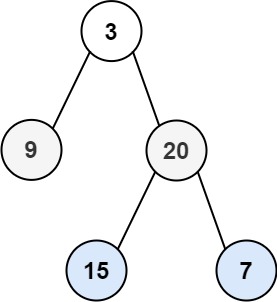
Input: root = [3,9,20,null,null,15,7]
Output: [[3],[9,20],[15,7]]
- (LeetCode: 102. Binary Tree Level Order Traversal)
Binary Tree Level Order Traversal:
Given the
rootof a binary tree, return the level order traversal of its nodes' values. (i.e., from left to right, level by level).Example 1:
Input: root = [3,9,20,null,null,15,7] Output: [[3],[9,20],[15,7]]
- (LeetCode: 102. Binary Tree Level Order Traversal)
Frequently Asked Questions
What is Breadth First Search?
Breadth First Search is a searching algorithm used to efficiently locate a specific element within a sorted array. It works by repeatedly dividing the search interval in half, eliminating half of the elements at each step. This results in a time complexity of O(log n), where n is the number of elements.
When should I use Breadth First Search?
Breadth First Search is most effective when dealing with large datasets that are already sorted. It is a preferred choice for scenarios where quick retrieval of data is essential. However, it is not suitable for unsorted arrays or dynamic data.
What are the advantages of Breadth First Search?
- Efficiency: Breadth First Search has a time complexity of O(log n), making it significantly faster than linear search for large datasets.
- Optimal for sorted data: It is ideal for finding elements in sorted arrays, making it a go-to choice for databases and data structures.
- Precision: Breadth First Search provides accurate results, indicating the presence or absence of an element.
What are the disadvantages of Breadth First Search?
- Requirement of sorted data: Breadth First Search only works on sorted data, which can be a limitation in some applications.
- Complexity: Implementing Breadth First Search correctly can be more challenging than linear search.
Conclusion
Breadth First Search is a highly efficient searching algorithm, particularly suited for large datasets, as it operates with logarithmic time complexity. In contrast to linear search, it excels in terms of speed and resource utilization. This article provides a comprehensive guide to implementing Breadth First Search, featuring practical code examples in various programming languages and highlighting its relevance in problem-solving on platforms like LeetCode. In summary, Breadth First Search stands as a foundational algorithm that underpins more advanced search methodologies.

